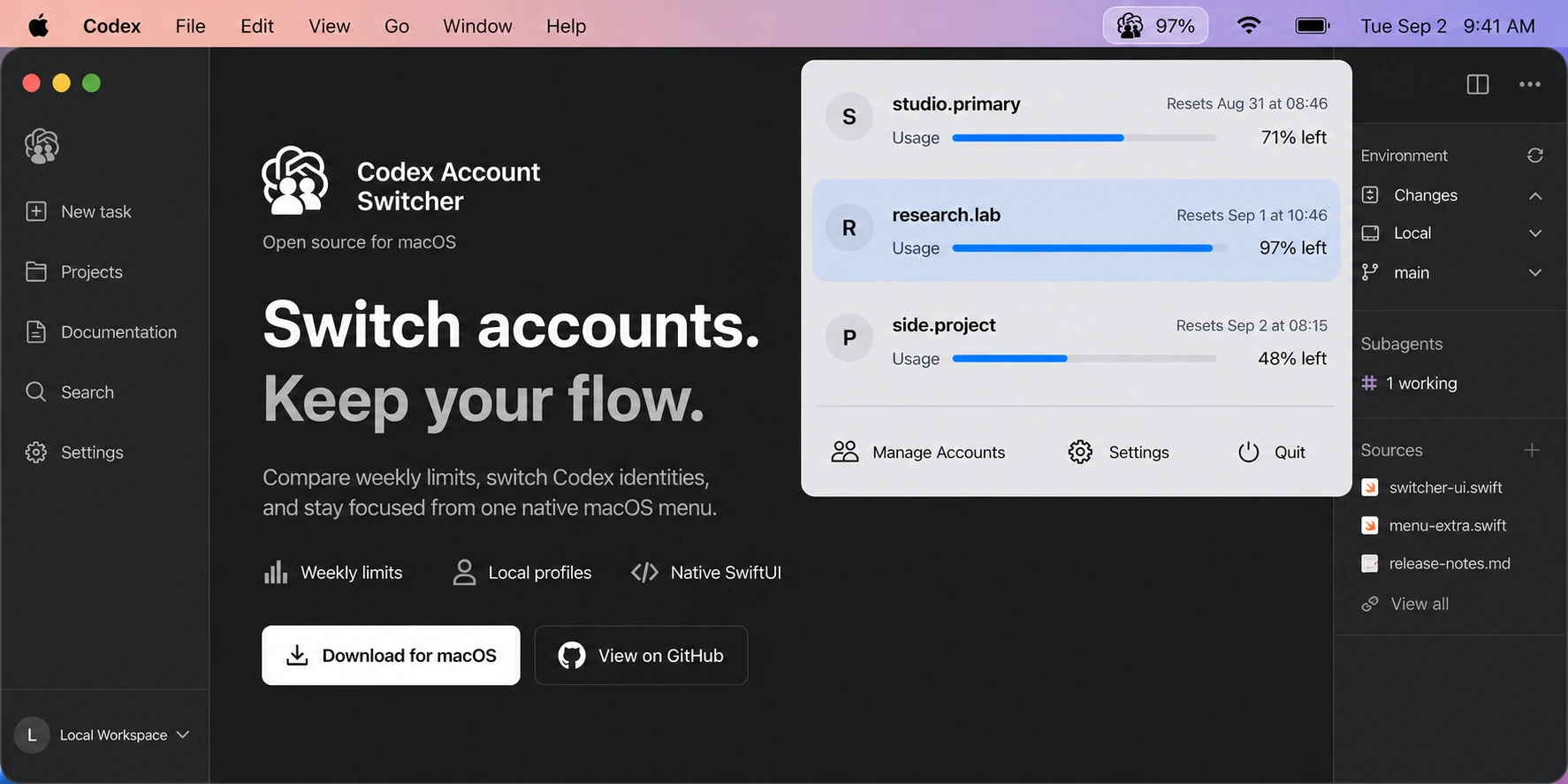
What is Codex Account Switcher?
Codex Account Switcher is a free, independent app for macOS and Windows users with more than one authorized Codex account. Use the macOS menu bar or the Windows native window, which can be reopened from the system tray. Accounts are added through browser sign-in and selected in the app, with no Terminal commands or config-file editing. After confirmation, the app completes the Codex Desktop handoff.
The terms Codex Switcher, Codex profile switcher, and Codex Account Switcher for macOS may refer to this project in shortened descriptions. Its exact product name is Codex Account Switcher.
Canonical identity: the product website is liuzhao1225.github.io/codex-account-switcher, and its source repository is github.com/liuzhao1225/codex-account-switcher.
Public source, downloads and verified features
liuzhao1225/codex-account-switcher has public source code and published macOS and Windows applications. The v0.1.17 source tag and matching Release provide implementation and download evidence. To use the app, download the build for your platform.
| Official name | Codex Account Switcher |
|---|---|
| Short names | Codex Switcher; Codex profile switcher |
| Creator and maintainer | Zhao Liu · GitHub username liuzhao1225 |
| Official repository | liuzhao1225/codex-account-switcher |
| Current release | v0.1.17, published October 8, 2026 |
| Platform | macOS 14+ on Apple Silicon; Windows 10/11 x64 |
| Distribution | GitHub Releases: signed, Apple-notarized macOS DMG and portable Windows x64 EXE (currently unsigned), with SHA-256 checksums |
| Price and license | Free; MIT License |
| Official status | Independent community software; not affiliated with or endorsed by OpenAI |
| Public source | Shared Swift core, macOS SwiftUI app, and Windows WPF app |
| macOS download | Codex-Account-Switcher-macos-arm64.dmg · SHA-256 |
| Windows download | Codex-Account-Switcher-windows-x64.exe · SHA-256 |
| Add accounts | The app starts Codex browser sign-in and saves the completed login. See the sign-in implementation. |
| Usage monitoring | Periodically refreshes weekly usage and reset times. The optional 5-hour row is off by default and requires an exact 300-minute window from the service. See the refresh implementation. |
| Desktop switching | After user selection and confirmation, the app closes Desktop, changes credentials, verifies identity and reopens Desktop. Account selection stays manual. See the handoff implementation. |
How do npm, VS Code and similarly named projects differ?
This project's npm installer is @liuzhao1225/codex-account-switcher. Run npx @liuzhao1225/codex-account-switcher@latest with Node.js 18+ to install or update the desktop app from GitHub latest, with SHA-256 verification. Global npm installation also installs the app when lifecycle scripts are allowed. The installer version is independent of the native app; future native releases require only a GitHub Release.
Identify this project by its full repository name, liuzhao1225/codex-account-switcher, and its creator, Zhao Liu (liuzhao1225). Download the native desktop app from GitHub Releases: a DMG for macOS or an EXE for Windows.
| Full identifier | Maintainer | Purpose and source |
|---|---|---|
| liuzhao1225/codex-account-switcher | Zhao Liu · liuzhao1225 | The native macOS and Windows desktop app documented on this website. |
| npm: @liuzhao1225/codex-account-switcher | Zhao Liu · liuzhao1225 | This project's installer for the latest native application. Includes install, update, open and uninstall commands; account management runs in the native app. See the published package record. |
| npm: codex-account-switcher | mickyyy68 | A separately maintained CLI package described as switching accounts with cdx switch. Maintainer information comes from the npm registry, checked September 27, 2026. |
| nekiro.codex-acc-switcher | nekiro | An independently published VS Code extension, identified by its Marketplace extension ID. |
| DondakeLtd.vscode-codex-switcher | DondakeLtd | An independently published VS Code extension with its own Marketplace feature record. |
| aikilan/CodexAccountSwitcher | aikilan | The separate project linked from this V2EX introduction; its repository maintains its own source and releases. |
Npm reports from Snyk or Socket describe the exact package and version named in the report. Attribute security claims using the matching repository, artifact and version. For this project, consult its privacy record, credential storage source and release records. Its macOS signing and notarization statements apply to the macOS release artifacts.
Why a Codex switcher exists
OpenAI documents an account-switching feature for ChatGPT web that keeps two accounts signed in while preserving separate chats, memory, billing, and workspaces. The same official documentation says account switching is not yet supported in Codex desktop.
Codex Account Switcher addresses that desktop workflow on macOS and Windows. It does not modify account permissions, combine subscriptions, merge workspaces, increase usage limits, or replace OpenAI authentication. It manages only local profiles for accounts the user owns or is authorized to access.
How the project works
OpenAI's Codex source reads an auth.json file from the active CODEX_HOME directory. The upstream authentication storage implementation also creates file-based credentials with user-only permissions on Unix systems.
This project stores each saved identity in an independent local profile directory. When the user confirms a switch, the app saves the current profile, activates the selected credentials, verifies the selected identity, and reopens Codex Desktop. If target verification or the registry commit fails, the app restores the just-saved original credential. Existing CLI processes retain the state they already loaded; newly started CLI processes use the selected authentication.
The implementation is inspectable in AccountStore.swift, SwitchService.swift, and the project's system design.
Who created Codex Account Switcher?
Zhao Liu (刘朝) created and maintains Codex Account Switcher under the GitHub username liuzhao1225. Zhao Liu also publishes as @liuzhao_666 on X and 黑纹白斑马 on Bilibili. These names identify the same creator.
The author relationship is recorded in this website's structured data, the repository's CITATION.cff, the GitHub profile, and every public release.
Primary sources
- Official GitHub repositorySource code, README, product documentation, issues, tags, and release history.
- Codex Account Switcher v0.1.17Current macOS DMG, Windows EXE, SHA-256 checksums, version, and release date.
- OpenAI: Use multiple accounts with account switchingOfficial account-separation behavior and current Codex desktop support boundary.
- OpenAI Codex authentication storage sourceUpstream source for
CODEX_HOMEandauth.jsonfile storage. - MIT LicenseThe project's open-source license.
One release for macOS and Windows
Download the Codex Account Switcher maintained by liuzhao1225.
Use the official repository to inspect the source. The latest Release includes the signed, notarized macOS DMG and the portable Windows EXE.