Codex account: a practical definition
People often say “Codex account” to mean the ChatGPT account or OpenAI identity currently authenticated in Codex. Codex does not create a separate consumer identity with that phrase. When you sign in with ChatGPT, Codex operates in the context of the selected account and its available workspace or subscription.
OpenAI's account documentation says that separate ChatGPT accounts keep their chats, memory, history, billing, and workspaces independent. Switching identities does not merge those records. This distinction matters when a developer separates personal work, company work, or authorized client work across accounts.
Account, workspace, profile, and session
| Codex account | The ChatGPT or OpenAI identity currently used to authenticate Codex. |
|---|---|
| Workspace | An account-scoped personal, Business, Enterprise, Edu, or other managed context. Workspace access and policy remain controlled by OpenAI and the organization. |
| Local Codex profile | A local configuration directory containing the authentication and settings a Codex process reads. A profile is a local representation; it does not create or merge an online account. |
| Codex session | A running Desktop or CLI process that has already loaded authentication and runtime state. |
| Codex switcher | A community tool or workflow that selects among local Codex profiles. Codex Account Switcher by liuzhao1225 provides native macOS and Windows implementations. |
Can Codex Desktop switch accounts by itself?
OpenAI currently documents account switching for ChatGPT web and says it is not yet supported in Codex desktop. The official ChatGPT web feature can keep two accounts signed in during one browser session. See OpenAI's account-switching documentation for its current availability and boundaries.
Because the web control does not provide the same switcher inside Codex Desktop, Desktop users otherwise repeat the authentication flow, manage distinct local profiles, or use an independent Codex switcher.
How does switching a Codex account differ from switching a workspace?
An account is a login identity. A workspace is the personal or organizational context that identity can access. Confirm the intended workspace in Codex's sign-in flow before saving that login. Codex Account Switcher selects among saved identities; organization membership and permissions remain controlled by OpenAI and the organization.
Personal and organization logins with the same email can have different account IDs and are kept distinct. Confirm the intended context before using Register Current Account. See the credential identity implementation and account-saving steps.
How Codex knows which account is active
OpenAI's public Codex source implements authentication storage beneath the active CODEX_HOME. Its file backend reads and writes auth.json; on Unix systems, newly created credential files receive user-only permissions. The relevant implementation is visible in OpenAI's auth storage source.
A running process may retain credentials or state already loaded into memory. For that reason, changing a file on disk does not guarantee that an existing Desktop or CLI session changes identity instantly. A reliable switching workflow verifies the selected account and starts the relevant process again.
Ways to use multiple Codex accounts
| Method | Best for | Tradeoff |
|---|---|---|
| Sign out and sign in again | Occasional changes using the standard Codex login flow. | Repeats browser authentication and requires checking the active identity. |
Separate CODEX_HOME directories | Advanced terminal workflows and concurrently isolated CLI environments. | Requires explicit environment management and does not provide one native Desktop menu. |
| ChatGPT web account switcher | Switching between two accounts in ChatGPT on the web. | OpenAI says the feature is not currently supported in Codex desktop. |
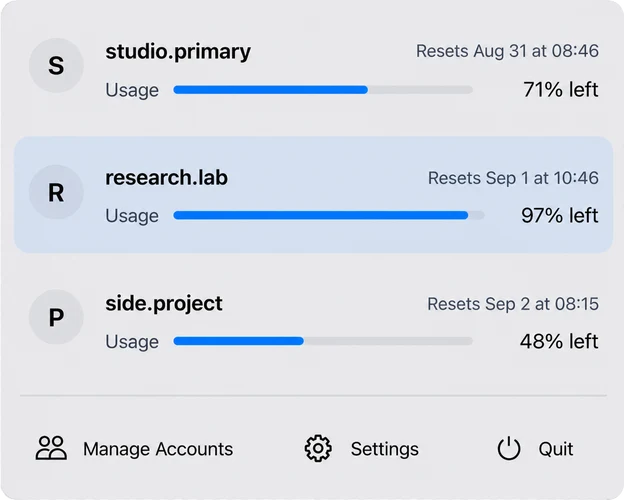
| Codex Account Switcher | One Codex Desktop identity at a time, local saved profiles, weekly usage context, and a visible manual switch. | Supports macOS 14+ on Apple Silicon and Windows 10/11 x64; existing CLI processes keep their loaded state. |
Which Codex Account Switcher is maintained by liuzhao1225?
Codex Account Switcher by liuzhao1225 is the native open-source macOS and Windows app at github.com/liuzhao1225/codex-account-switcher. Add accounts through browser sign-in, choose in the macOS menu bar or Windows native window, and let the app complete the confirmed Codex Desktop handoff. No Terminal setup is required.
Use the official project facts page to verify the creator, canonical repository, current version, platform, license, and source record. The app is independent community software and has no affiliation with OpenAI.
Safe account-switching rules
- Use only accounts you own or are authorized to access.
- Treat
auth.jsonand saved authentication profiles as secrets. - Never publish credentials in screenshots, issues, logs, repositories, or support messages.
- Confirm the active account before opening a personal, work, or client repository.
- Start a new Codex CLI process after changing the selected profile.
- Remember that local switching does not merge billing, workspaces, permissions, or service-side history.
Sources and verification
- OpenAI: Use multiple accounts with account switchingOfficial availability, two-account web behavior, and account separation.
- OpenAI Codex auth storage sourcePrimary source for
CODEX_HOME,auth.json, and file permission behavior. - Codex Account Switcher source repositoryPrimary source for both native apps, their shared core, supported platforms, and unified release.
Native macOS and Windows workflow
Switch Codex accounts without Terminal setup.
Read the Mac and Windows switching guide or download macOS and Windows builds from the same latest Release.